> ## Documentation Index
> Fetch the complete documentation index at: https://help.suggix.com/llms.txt
> Use this file to discover all available pages before exploring further.
# Feedback Boards
> Create and organize boards for feature requests, bug reports, ideas, and roadmap feedback.
Boards are the main place where users submit feedback in Suggix. Each board has its own public URL, submission form, display settings, and collection of posts.
Use separate boards when different types of feedback need different instructions, review flows, or public visibility. Common examples include:
* Feature Requests
* Bug Reports
* Product Ideas
* Integrations
* Roadmap
## Create a board
Go to **Settings → Boards** in your Suggix dashboard.
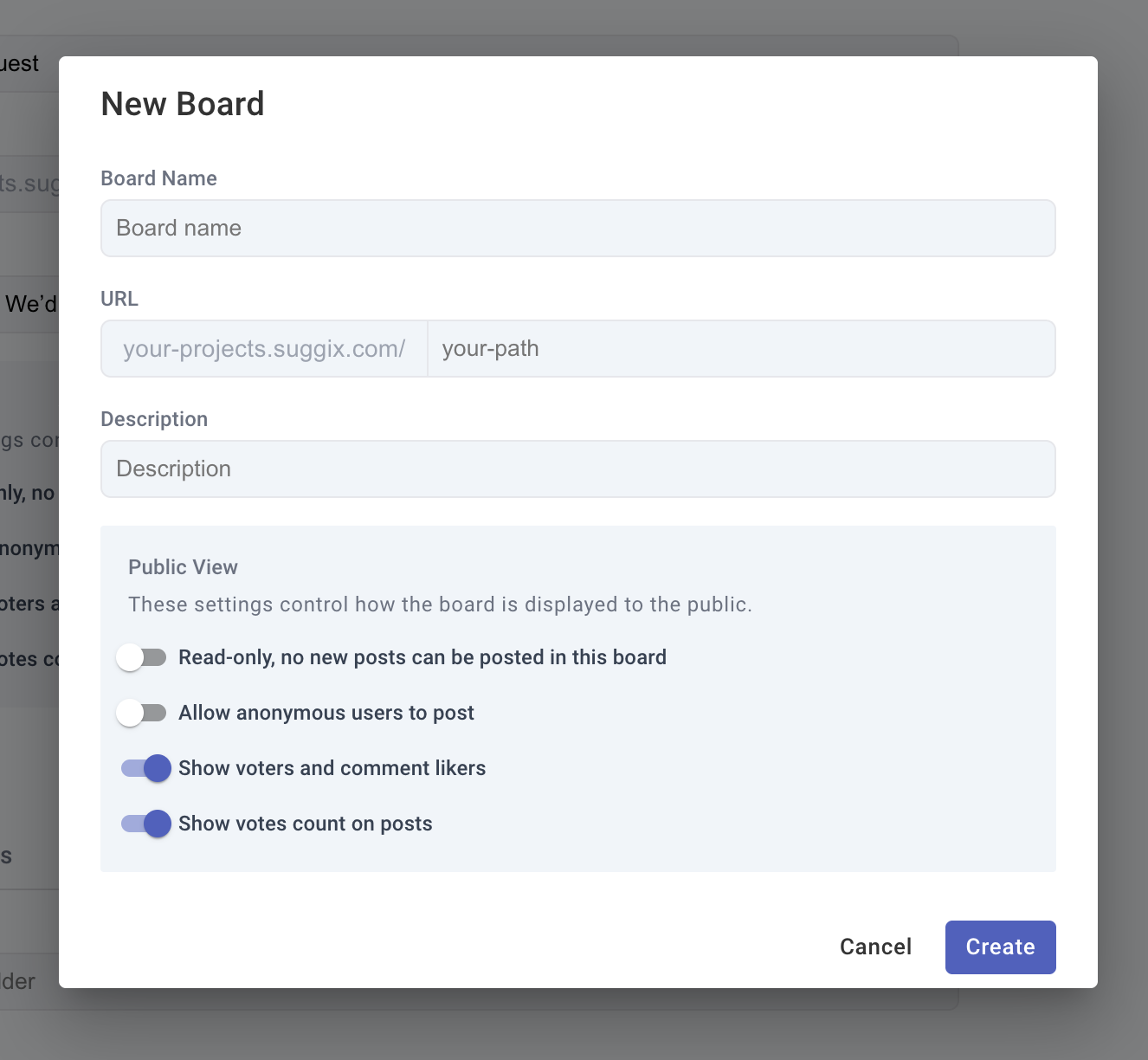
Add a board name, URL slug, and description. The name and description should help users understand what kind of feedback belongs on the board.
Decide whether users can create posts, whether anonymous posting is allowed, and whether vote counts and voters are visible.
After saving, open the public board URL and share it with users from your website, app, help center, or product emails.
 ## Choose a board structure
Start with a small number of boards. Too many boards make it harder for users to decide where to post and harder for your team to triage feedback.
| Structure | Best for |
| ------------------------------ | --------------------------------------------------- |
| One board for all feedback | Early products, small teams, low feedback volume |
| Feature requests + bug reports | Teams that need to separate ideas from defects |
| Boards by product area | Larger products with clear modules or product lines |
| Read-only roadmap board | Public status tracking without new submissions |
If users often submit the same type of request in the wrong place, rename the board or update its description before creating more boards.
## Configure submission copy
Each board can customize the form text users see when they create a post.
* **Title placeholder**: Ask for a concise summary.
* **Details placeholder**: Ask for context, use cases, screenshots, or expected behavior.
* **Button text**: Match the board purpose, such as `Submit idea` or `Report bug`.
Clear prompts improve the quality of feedback and reduce follow-up work for your team.
## Manage posts
After users submit feedback, review posts regularly and keep the public status current.
* Merge or close duplicate posts when needed.
* Apply tags to group related feedback.
* Update status when work moves from review to planned, in progress, or completed.
* Add comments when you need more context or want to explain a decision.
For the full dashboard workflow, see [Post Management](/guides/post-management).
## Related settings
Configure board names, URLs, public behavior, form copy, tags, and deletion.
Learn how users browse, submit, vote on, and discuss feedback.
## Choose a board structure
Start with a small number of boards. Too many boards make it harder for users to decide where to post and harder for your team to triage feedback.
| Structure | Best for |
| ------------------------------ | --------------------------------------------------- |
| One board for all feedback | Early products, small teams, low feedback volume |
| Feature requests + bug reports | Teams that need to separate ideas from defects |
| Boards by product area | Larger products with clear modules or product lines |
| Read-only roadmap board | Public status tracking without new submissions |
If users often submit the same type of request in the wrong place, rename the board or update its description before creating more boards.
## Configure submission copy
Each board can customize the form text users see when they create a post.
* **Title placeholder**: Ask for a concise summary.
* **Details placeholder**: Ask for context, use cases, screenshots, or expected behavior.
* **Button text**: Match the board purpose, such as `Submit idea` or `Report bug`.
Clear prompts improve the quality of feedback and reduce follow-up work for your team.
## Manage posts
After users submit feedback, review posts regularly and keep the public status current.
* Merge or close duplicate posts when needed.
* Apply tags to group related feedback.
* Update status when work moves from review to planned, in progress, or completed.
* Add comments when you need more context or want to explain a decision.
For the full dashboard workflow, see [Post Management](/guides/post-management).
## Related settings
Configure board names, URLs, public behavior, form copy, tags, and deletion.
Learn how users browse, submit, vote on, and discuss feedback.