> ## Documentation Index
> Fetch the complete documentation index at: https://help.suggix.com/llms.txt
> Use this file to discover all available pages before exploring further.
# Board Configuration Guide
> Learn how to configure Boards in Suggix, including general settings, public view options, custom forms, tags, and deletion.
# What is a Board
In Suggix, a Board is the core unit for collecting and displaying user feedback. Each Board usually represents a specific feedback type, such as Feature Requests, Bug Reports, or Ideas.
Every Board has its own:
* Public URL
* Display rules
* Submission form
* Voting and interaction settings
A single workspace can contain multiple Boards to organize different kinds of feedback.
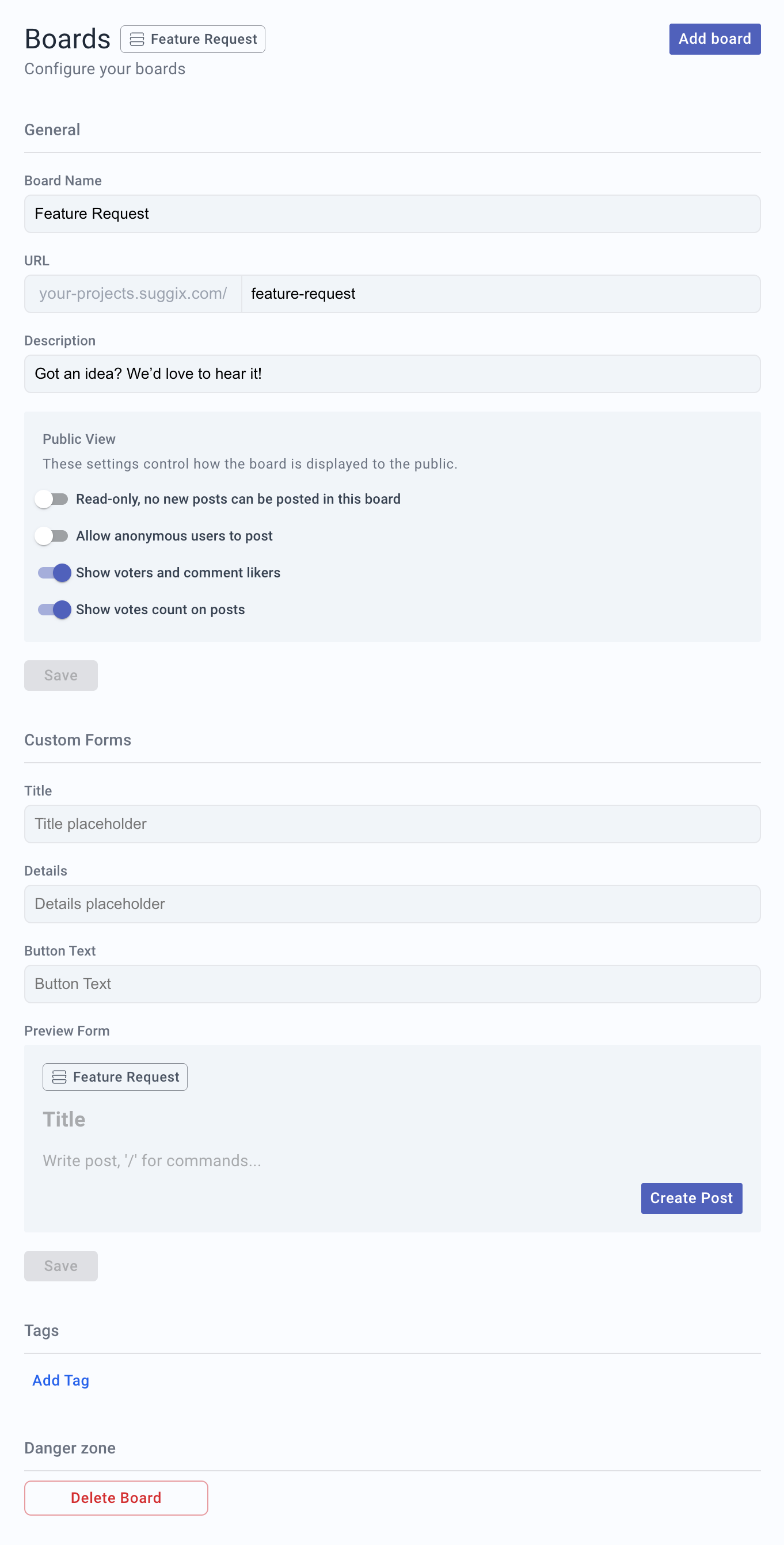 ## General Settings
### Board Name
The name of the Board shown in both the admin panel and the public feedback page.
* Example: `Feature Requests`
* Use a clear and descriptive name that reflects the Board's purpose
### URL
The public access path for this Board.
* Format: `https://your-workspace.suggix.com/{board-slug}`
* You only need to edit the slug, for example `feature-requests`
If the Board is already shared publicly, avoid changing the URL to prevent breaking existing links.
### Description
A short description displayed at the top of the Board page to explain its purpose.
* Example: `Got an idea? We'd love to hear it!`
## Public View
These settings control how the Board is displayed and used by public users.
### Read-only
When enabled:
* Users can view existing posts only
* New posts cannot be created
This is useful for announcement Boards, public roadmaps, or archived feedback.
### Allow anonymous users to post
When enabled:
* Users can submit feedback without logging in
* Posts are marked as submitted by anonymous users
Allowing anonymous posts may increase spam. Review public submissions regularly if this option is enabled.
### Show voters and comment likers
When enabled:
* Users can see who voted on a post
* Users can see who liked comments
Use this when public identity is important for community discussion. Disable it if you want voting and comment reactions to feel more private.
### Show votes count on posts
When enabled:
* Posts display their total vote count
* Users can quickly identify popular requests
* Your team can use votes as one input for prioritization
Once saved, these changes immediately affect the public Board view.
## Custom Forms
Customize the text users see when creating a new post.
### Title Placeholder
Placeholder text for the post title input field.
* Example: `Briefly describe your idea`
### Details Placeholder
Placeholder text for the post details input field.
* Example: `Add more context, screenshots, or use cases`
### Button Text
The text displayed on the submission button.
* Example: `Create Post`
* Example: `Submit Feedback`
The live preview shows how the submission form will appear to users.
Clear placeholder text significantly improves the quality of submitted feedback.
## Tags
Tags help categorize and filter posts within a Board.
* Click **Add Tag** to create new tags.
* Use tags for feature areas, priority levels, product modules, or customer segments.
* Examples: `UI`, `API`, `High Priority`, `Enterprise`
Consistent tag usage makes feedback easier to manage and analyze over time.
## Danger Zone
### Delete Board
Permanently deletes the Board.
Deleting a Board is irreversible:
* All posts, comments, and votes will be permanently removed.
* The public URL will stop working immediately.
Make sure the Board is no longer needed before deleting it.
## General Settings
### Board Name
The name of the Board shown in both the admin panel and the public feedback page.
* Example: `Feature Requests`
* Use a clear and descriptive name that reflects the Board's purpose
### URL
The public access path for this Board.
* Format: `https://your-workspace.suggix.com/{board-slug}`
* You only need to edit the slug, for example `feature-requests`
If the Board is already shared publicly, avoid changing the URL to prevent breaking existing links.
### Description
A short description displayed at the top of the Board page to explain its purpose.
* Example: `Got an idea? We'd love to hear it!`
## Public View
These settings control how the Board is displayed and used by public users.
### Read-only
When enabled:
* Users can view existing posts only
* New posts cannot be created
This is useful for announcement Boards, public roadmaps, or archived feedback.
### Allow anonymous users to post
When enabled:
* Users can submit feedback without logging in
* Posts are marked as submitted by anonymous users
Allowing anonymous posts may increase spam. Review public submissions regularly if this option is enabled.
### Show voters and comment likers
When enabled:
* Users can see who voted on a post
* Users can see who liked comments
Use this when public identity is important for community discussion. Disable it if you want voting and comment reactions to feel more private.
### Show votes count on posts
When enabled:
* Posts display their total vote count
* Users can quickly identify popular requests
* Your team can use votes as one input for prioritization
Once saved, these changes immediately affect the public Board view.
## Custom Forms
Customize the text users see when creating a new post.
### Title Placeholder
Placeholder text for the post title input field.
* Example: `Briefly describe your idea`
### Details Placeholder
Placeholder text for the post details input field.
* Example: `Add more context, screenshots, or use cases`
### Button Text
The text displayed on the submission button.
* Example: `Create Post`
* Example: `Submit Feedback`
The live preview shows how the submission form will appear to users.
Clear placeholder text significantly improves the quality of submitted feedback.
## Tags
Tags help categorize and filter posts within a Board.
* Click **Add Tag** to create new tags.
* Use tags for feature areas, priority levels, product modules, or customer segments.
* Examples: `UI`, `API`, `High Priority`, `Enterprise`
Consistent tag usage makes feedback easier to manage and analyze over time.
## Danger Zone
### Delete Board
Permanently deletes the Board.
Deleting a Board is irreversible:
* All posts, comments, and votes will be permanently removed.
* The public URL will stop working immediately.
Make sure the Board is no longer needed before deleting it.