> ## Documentation Index
> Fetch the complete documentation index at: https://help.suggix.com/llms.txt
> Use this file to discover all available pages before exploring further.
# Workspace General Settings
> Configure basic information and branding for your Suggix workspace
The **General** settings allow you to configure your workspace’s identity, branding, and public-facing information.\
These settings affect how your workspace appears across the dashboard and public feedback portal.
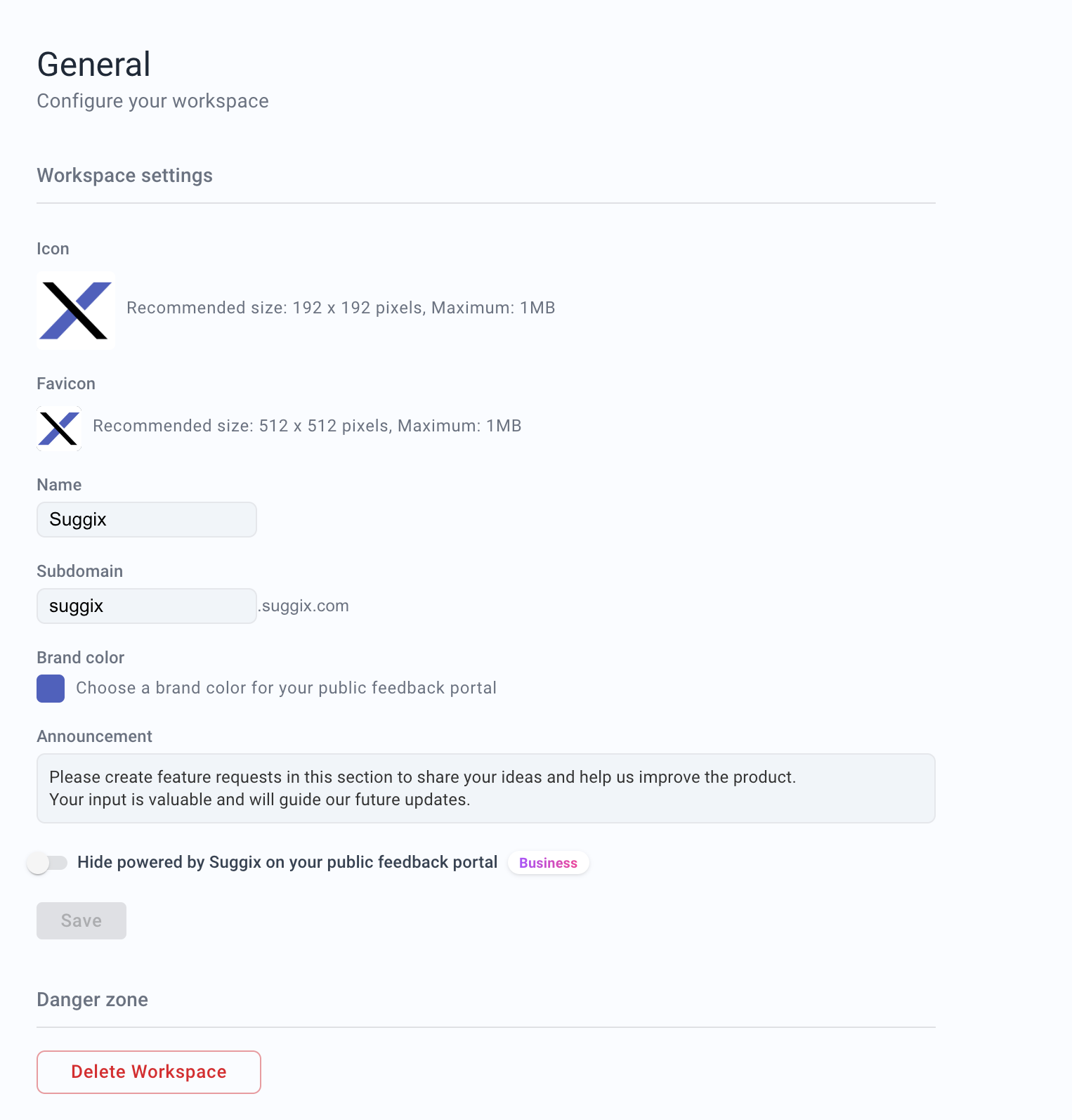 ## Properties
Workspace icon displayed in the dashboard, workspace switcher, and the header of your public feedback portal.
This icon is shown alongside the workspace name in the feedback site header.
* Recommended size: `192 × 192` pixels
* Maximum file size: `1MB`
Favicon used in browser tabs for your public feedback portal.
* Recommended size: `512 × 512` pixels
* Maximum file size: `1MB`
The display name of your workspace.
This name appears in the dashboard, public feedback portal, and notifications.
Example: `Suggix`
The subdomain used for your public feedback portal.
Your portal will be accessible at:
`https://{subdomain}.suggix.com`
Example: `suggix`
Changing the subdomain changes the public portal URL. Update any links in your product, help center, or emails after changing it.
Primary brand color used on your public feedback portal.
This color is applied to buttons, highlights, and key UI elements to match your brand identity.
Example: `#5B6CFF`
A public announcement displayed at the top of your feedback portal.
Use this to share important messages, guidelines, or updates with your users.
Example:
`Please create feature requests in this section to share your ideas and help us improve the product.`
## Public portal URL
Your workspace is available at:
```text theme={null}
https://{subdomain}.suggix.com
```
If you configure a custom domain, users can also access the same portal through your branded domain. See [Custom Domains](/development/custom-domains).
## Branding checklist
Before sharing your portal publicly, confirm that:
* The workspace name matches your product or company name.
* The icon and favicon are uploaded.
* The brand color has enough contrast for buttons and links.
* The announcement text gives users clear submission guidance.
* The public URL is correct.
Hide the **Powered by Suggix** branding on your public feedback portal.
> Available on the **Business** plan only.
Example: `false`
## Danger Zone
Permanently deletes the workspace and all associated data.
⚠️ This action is **irreversible**.\
All boards, posts, members, and settings will be permanently removed.
## Properties
Workspace icon displayed in the dashboard, workspace switcher, and the header of your public feedback portal.
This icon is shown alongside the workspace name in the feedback site header.
* Recommended size: `192 × 192` pixels
* Maximum file size: `1MB`
Favicon used in browser tabs for your public feedback portal.
* Recommended size: `512 × 512` pixels
* Maximum file size: `1MB`
The display name of your workspace.
This name appears in the dashboard, public feedback portal, and notifications.
Example: `Suggix`
The subdomain used for your public feedback portal.
Your portal will be accessible at:
`https://{subdomain}.suggix.com`
Example: `suggix`
Changing the subdomain changes the public portal URL. Update any links in your product, help center, or emails after changing it.
Primary brand color used on your public feedback portal.
This color is applied to buttons, highlights, and key UI elements to match your brand identity.
Example: `#5B6CFF`
A public announcement displayed at the top of your feedback portal.
Use this to share important messages, guidelines, or updates with your users.
Example:
`Please create feature requests in this section to share your ideas and help us improve the product.`
## Public portal URL
Your workspace is available at:
```text theme={null}
https://{subdomain}.suggix.com
```
If you configure a custom domain, users can also access the same portal through your branded domain. See [Custom Domains](/development/custom-domains).
## Branding checklist
Before sharing your portal publicly, confirm that:
* The workspace name matches your product or company name.
* The icon and favicon are uploaded.
* The brand color has enough contrast for buttons and links.
* The announcement text gives users clear submission guidance.
* The public URL is correct.
Hide the **Powered by Suggix** branding on your public feedback portal.
> Available on the **Business** plan only.
Example: `false`
## Danger Zone
Permanently deletes the workspace and all associated data.
⚠️ This action is **irreversible**.\
All boards, posts, members, and settings will be permanently removed.